
這應該是剛開始學ASP.NET MVC 常犯的錯誤,一般我們會新增一個資料夾”Helpers”來放 HtmlHelper的程式,如在資料夾新增一個class,如:HMTLHelperExtensions.cs。
using System;
using System.Web.Mvc;

namespace DemoCustomIndentity.Helpers
{
    public static class HMTLHelperExtensions
    {
       public static string IsSelected(this HtmlHelper html, string controller = null, string action = null, string cssClass = null)
       {

          if (String.IsNullOrEmpty(cssClass))
          cssClass = "active";

          string currentAction = (string)html.ViewContext.RouteData.Values["action"];
          string currentController = (string)html.ViewContext.RouteData.Values["controller"];

          if (String.IsNullOrEmpty(controller))
          controller = currentController;

         if (String.IsNullOrEmpty(action))
         action = currentAction;

         return controller == currentController && action == currentAction ?
         cssClass : String.Empty;
       }

    public static string PageClass(this HtmlHelper html)
    {
       string currentAction = (string)html.ViewContext.RouteData.Values["action"];
       return currentAction;
     }
   }
}
當你將程式跑起來時,有時會得到下面的錯誤畫面
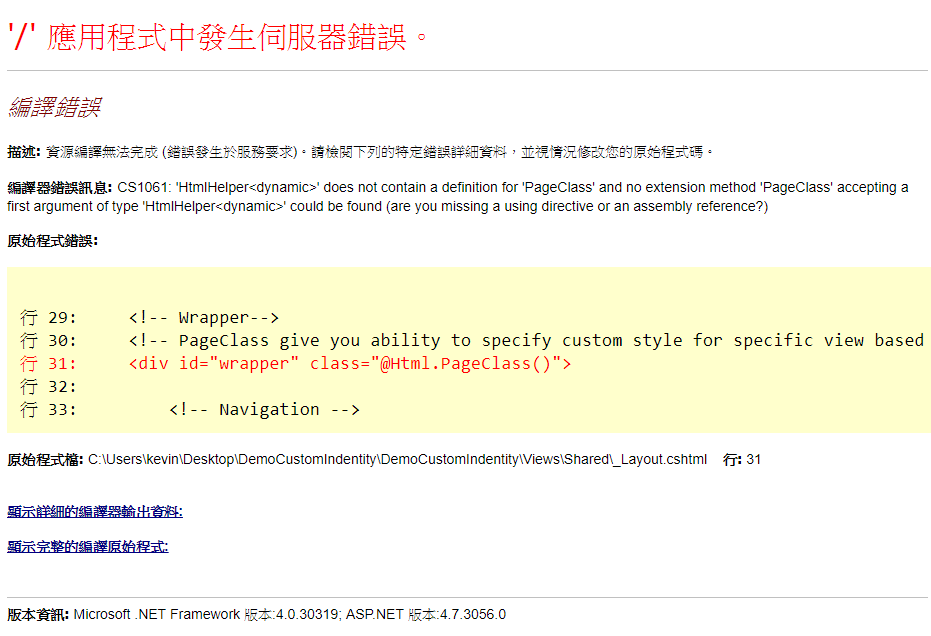
解決方法也下列幾種方式 :
第一種方法是在Views/Web.config 增加命名空間
<system.web.webPages.razor>
<host factoryType="System.Web.Mvc.MvcWebRazorHostFactory, System.Web.Mvc, Version=5.2.4.0, Culture=neutral, PublicKeyToken=31BF3856AD364E35" />
<pages pageBaseType="System.Web.Mvc.WebViewPage">
<namespaces>
<add namespace="System.Web.Mvc" />
<add namespace="System.Web.Mvc.Ajax" />
<add namespace="System.Web.Mvc.Html" />
<add namespace="System.Web.Optimization"/>
<add namespace="System.Web.Routing" />
<add namespace="DemoCustomIndentity" />
<!-- 增加這一行 -->
<add namespace="DemoCustomIndentity.Helpers" />
</namespaces>
</pages>
</system.web.webPages.razor>
第二種方法是改變 HMTLHelperExtensions.cs命名空間,”Helpers” 拿掉,或者直接將命名空間改成 “System.Web.Mvc.Html”
using System;
using System.Web.Mvc;

namespace DemoCustomIndentity
{
    public static class HMTLHelperExtensions
    {
       ......
   }
}
using System;
using System.Web.Mvc;

namespace System.Web.Mvc.Html
{
    public static class HMTLHelperExtensions
    {
       ......
   }
}